Linux系统配置与安全
在完成文件编辑的学习之后,也就可以重新回到服务相关的内容,去通过了解配置,更改配置文件等方式去使我们常用的服务更快捷,更方便
SSH
配置文件与配置
配置文件的位置在/etc/ssh/sshd_config,简单看看配置文件的内容
# This is the sshd server system-wide configuration file.  See
# sshd_config(5) for more information.

# This sshd was compiled with PATH=/usr/local/sbin:/usr/local/bin:/usr/sbin:/usr                                                                  /bin:/sbin:/bin:/usr/games

# The strategy used for options in the default sshd_config shipped with
# OpenSSH is to specify options with their default value where
# possible, but leave them commented.  Uncommented options override the
# default value.

Include /etc/ssh/sshd_config.d/*.conf

# When systemd socket activation is used (the default), the socket
# configuration must be re-generated after changing Port, AddressFamily, or
# ListenAddress.
#
# For changes to take effect, run:
#
#   systemctl daemon-reload
#   systemctl restart ssh.socket
#
#Port 22
#AddressFamily any
#ListenAddress 0.0.0.0
#ListenAddress ::

#HostKey /etc/ssh/ssh_host_rsa_key
#HostKey /etc/ssh/ssh_host_ecdsa_key
#HostKey /etc/ssh/ssh_host_ed25519_key

# Ciphers and keying
#RekeyLimit default none

# Logging
#SyslogFacility AUTH
#LogLevel INFO

# Authentication:

#LoginGraceTime 2m
#PermitRootLogin prohibit-password
#StrictModes yes
#MaxAuthTries 6
#MaxSessions 10

#PubkeyAuthentication yes

# Expect .ssh/authorized_keys2 to be disregarded by default in future.
#AuthorizedKeysFile     .ssh/authorized_keys .ssh/authorized_keys2

#AuthorizedPrincipalsFile none

#AuthorizedKeysCommand none
#AuthorizedKeysCommandUser nobody

# For this to work you will also need host keys in /etc/ssh/ssh_known_hosts
#HostbasedAuthentication no
# Change to yes if you don't trust ~/.ssh/known_hosts for
# HostbasedAuthentication
#IgnoreUserKnownHosts no
# Don't read the user's ~/.rhosts and ~/.shosts files
#IgnoreRhosts yes

# To disable tunneled clear text passwords, change to no here!
#PasswordAuthentication yes
#PermitEmptyPasswords no

# Change to yes to enable challenge-response passwords (beware issues with
# some PAM modules and threads)
KbdInteractiveAuthentication no

# Kerberos options
#KerberosAuthentication no
#KerberosOrLocalPasswd yes
#KerberosTicketCleanup yes
#KerberosGetAFSToken no

# GSSAPI options
#GSSAPIAuthentication no
#GSSAPICleanupCredentials yes
#GSSAPIStrictAcceptorCheck yes
#GSSAPIKeyExchange no

# Set this to 'yes' to enable PAM authentication, account processing,
# and session processing. If this is enabled, PAM authentication will
# be allowed through the KbdInteractiveAuthentication and
# PasswordAuthentication.  Depending on your PAM configuration,
# PAM authentication via KbdInteractiveAuthentication may bypass
# the setting of "PermitRootLogin prohibit-password".
# If you just want the PAM account and session checks to run without
# PAM authentication, then enable this but set PasswordAuthentication
# and KbdInteractiveAuthentication to 'no'.
UsePAM yes

#AllowAgentForwarding yes
#AllowTcpForwarding yes
#GatewayPorts no
X11Forwarding yes
#X11DisplayOffset 10
#X11UseLocalhost yes
#PermitTTY yes
PrintMotd no
#PrintLastLog yes
#TCPKeepAlive yes
#PermitUserEnvironment no
#Compression delayed
#ClientAliveInterval 0
#ClientAliveCountMax 3
#UseDNS no
#PidFile /run/sshd.pid
#MaxStartups 10:30:100
#PermitTunnel no
#ChrootDirectory none
#VersionAddendum none

# no default banner path
#Banner none

# Allow client to pass locale environment variables
AcceptEnv LANG LC_*

# override default of no subsystems
Subsystem       sftp    /usr/lib/openssh/sftp-server

# Example of overriding settings on a per-user basis
#Match User anoncvs
#       X11Forwarding no
#       AllowTcpForwarding no
#       PermitTTY no
#       ForceCommand cvs server
公钥和私钥
生成密钥
认证方式上面好像除了现在简单的用户名密码认证还看到了一个被注释掉的选项PubkeyAuthentication,这种登录方式相比于账户密码的方式会更快捷和安全,所以还是比较建议打开的
首先需要在本地生成本机的公钥和私钥,打开Windows的PowerShell,在里面输入命令生成密钥与公钥
ssh-keygen会显示下面这样的输出
Generating public/private ed25519 key pair.
Enter file in which to save the key (C:\Users\Ivo/.ssh/id_ed25519):意思是输入存放公钥与私钥的目录与文件名,默认路径是C:\Users\Ivo\.ssh\id_ed25519,如果自定义也是在自己这个用户目录下面
输入后回车进入目录会出现下面两个文件
- id_ed25519
- id_ed25519.pub
其中.pub文件是公钥,另一个则是私钥
使用密钥
本地连接使用私钥,在服务器上存放公钥,进配置文件更改以下行,取消注释即可
PubkeyAuthentication yes

# Expect .ssh/authorized_keys2 to be disregarded by default in future.
AuthorizedKeysFile .ssh/authorized_keys .ssh/authorized_keys2# This is the sshd server system-wide configuration file. See
# sshd_config(5) for more information.
# This sshd was compiled with PATH=/usr/local/sbin:/usr/local/bin:/usr/sbin:/usr /bin:/sbin:/bin:/usr/games
# The strategy used for options in the default sshd_config shipped with
# OpenSSH is to specify options with their default value where
# possible, but leave them commented. Uncommented options override the
# default value.
Include /etc/ssh/sshd_config.d/*.conf
# When systemd socket activation is used (the default), the socket
# configuration must be re-generated after changing Port, AddressFamily, or
# ListenAddress.
#
# For changes to take effect, run:
#
# systemctl daemon-reload
# systemctl restart ssh.socket
#
#Port 22
#AddressFamily any
#ListenAddress 0.0.0.0
#ListenAddress ::
#HostKey /etc/ssh/ssh_host_rsa_key
#HostKey /etc/ssh/ssh_host_ecdsa_key
#HostKey /etc/ssh/ssh_host_ed25519_key
# Ciphers and keying
#RekeyLimit default none
# Logging
#SyslogFacility AUTH
#LogLevel INFO
# Authentication:
#LoginGraceTime 2m
#PermitRootLogin prohibit-password
#StrictModes yes
#MaxAuthTries 6
#MaxSessions 10
#PubkeyAuthentication yes
PubkeyAuthentication yes
# Expect .ssh/authorized_keys2 to be disregarded by default in future.
#AuthorizedKeysFile .ssh/authorized_keys .ssh/authorized_keys2
AuthorizedKeysFile .ssh/authorized_keys .ssh/authorized_keys2
#AuthorizedPrincipalsFile none
#AuthorizedKeysCommand none
#AuthorizedKeysCommandUser nobody
# For this to work you will also need host keys in /etc/ssh/ssh_known_hosts
#HostbasedAuthentication no
# Change to yes if you don't trust ~/.ssh/known_hosts for
# HostbasedAuthentication
#IgnoreUserKnownHosts no
# Don't read the user's ~/.rhosts and ~/.shosts files
#IgnoreRhosts yes
# To disable tunneled clear text passwords, change to no here!
#PasswordAuthentication yes
#PermitEmptyPasswords no
# Change to yes to enable challenge-response passwords (beware issues with
# some PAM modules and threads)
KbdInteractiveAuthentication no
# Kerberos options
#KerberosAuthentication no
#KerberosOrLocalPasswd yes
#KerberosTicketCleanup yes
#KerberosGetAFSToken no
# GSSAPI options
#GSSAPIAuthentication no
#GSSAPICleanupCredentials yes
#GSSAPIStrictAcceptorCheck yes
#GSSAPIKeyExchange no
# Set this to 'yes' to enable PAM authentication, account processing,
# and session processing. If this is enabled, PAM authentication will
# be allowed through the KbdInteractiveAuthentication and
# PasswordAuthentication. Depending on your PAM configuration,
# PAM authentication via KbdInteractiveAuthentication may bypass
# the setting of "PermitRootLogin prohibit-password".
# If you just want the PAM account and session checks to run without
# PAM authentication, then enable this but set PasswordAuthentication
# and KbdInteractiveAuthentication to 'no'.
UsePAM yes
#AllowAgentForwarding yes
#AllowTcpForwarding yes
#GatewayPorts no
X11Forwarding yes
#X11DisplayOffset 10
#X11UseLocalhost yes
#PermitTTY yes
PrintMotd no
#PrintLastLog yes
#TCPKeepAlive yes
#PermitUserEnvironment no
#Compression delayed
#ClientAliveInterval 0
#ClientAliveCountMax 3
#UseDNS no
#PidFile /run/sshd.pid
#MaxStartups 10:30:100
#PermitTunnel no
#ChrootDirectory none
#VersionAddendum none
# no default banner path
#Banner none
# Allow client to pass locale environment variables
AcceptEnv LANG LC_*
# override default of no subsystems
Subsystem sftp /usr/lib/openssh/sftp-server
# Example of overriding settings on a per-user basis
#Match User anoncvs
# X11Forwarding no
# AllowTcpForwarding no
# PermitTTY no
# ForceCommand cvs serverAuthorizedKeysFile是认证密钥的文件,文件位置在$HOME/.ssh/authorized_keys,我们需要将我们.pub文件内内容加入进去
vim $HOME/.ssh/authorized_keys将自己生成的公钥加入进去,多台机器则需要输入多台机器的,例如这样
ssh-ed25519 AAAAC3NzaC1lZDI1NTE5AAAAICZEYTc7XUGMLZX4gEXr6xxHt63xujviUdym6evKzqJy ivo@DESKTOP-BGG1MOL
ssh-ed25519 AAAAC3NzaC1lZDI1NTE5AAAAIIgwov09dnog5X+JMj+8uSrQBu5CXDpQwvKyxfY/bJa8 ivo@DESKTOP-KLLCI8I
重启ssh服务
systemctl restart sshd在MobaXterm加入自己的私钥
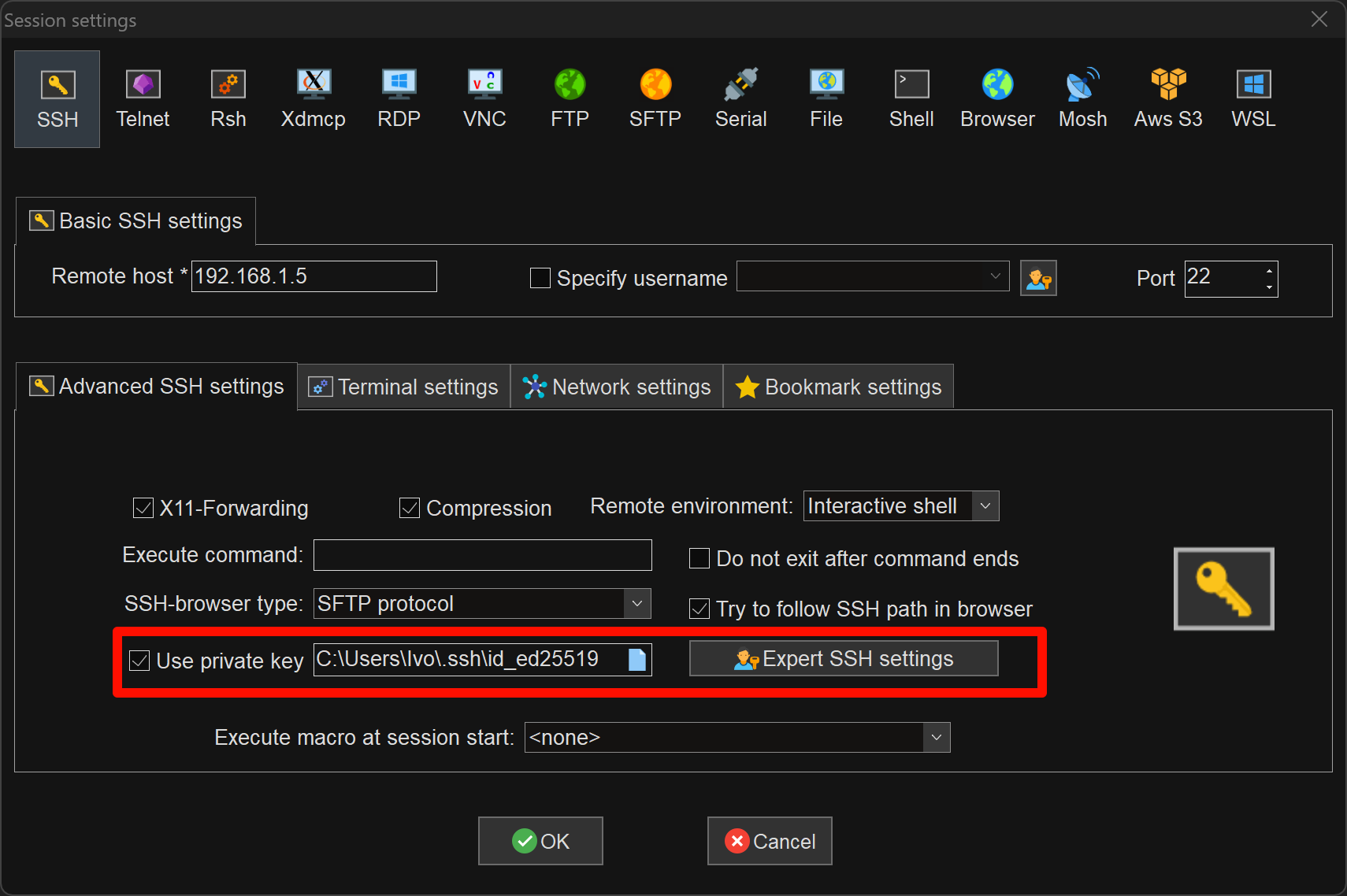
尝试连接,输入用户名后即可直接连接上自己的机器
端口
我们可以回忆一下我们连接自己虚拟机或者实体机的步骤
- 查看IP:在Linux系统机器上输入
ip addr查看机器的IP地址- 使用MobaXterm连接:在MobaXterm中输入机器的IP地址进行连接
但是在连接的时候有一个地方我们完全没有注意——Port端口
这个地方默认使用的22,这个22是默认端口,但是像这样的默认端口在rdp,vnc,http和https等协议中都是存在的,这样的端口都有自己的名字——标准端口,所以其他的端口可以叫作非标准端口,简称非标端口
但是使用这样的标准端口很容易被发现,所以我们可以更换为1024-65535中任何一个没有被占用的端口,只需要修改配置文件里面的Port即可
# This is the sshd server system-wide configuration file.  See
# sshd_config(5) for more information.

# This sshd was compiled with PATH=/usr/local/sbin:/usr/local/bin:/usr/sbin:/usr                                                                  /bin:/sbin:/bin:/usr/games

# The strategy used for options in the default sshd_config shipped with
# OpenSSH is to specify options with their default value where
# possible, but leave them commented.  Uncommented options override the
# default value.

Include /etc/ssh/sshd_config.d/*.conf

# When systemd socket activation is used (the default), the socket
# configuration must be re-generated after changing Port, AddressFamily, or
# ListenAddress.
#
# For changes to take effect, run:
#
#   systemctl daemon-reload
#   systemctl restart ssh.socket
#
#Port 22
Port 2222
#AddressFamily any
#ListenAddress 0.0.0.0
#ListenAddress ::

#HostKey /etc/ssh/ssh_host_rsa_key
#HostKey /etc/ssh/ssh_host_ecdsa_key
#HostKey /etc/ssh/ssh_host_ed25519_key

# Ciphers and keying
#RekeyLimit default none

# Logging
#SyslogFacility AUTH
#LogLevel INFO

# Authentication:

#LoginGraceTime 2m
#PermitRootLogin prohibit-password
#StrictModes yes
#MaxAuthTries 6
#MaxSessions 10

PubkeyAuthentication yes

# Expect .ssh/authorized_keys2 to be disregarded by default in future.
AuthorizedKeysFile     .ssh/authorized_keys .ssh/authorized_keys2

#AuthorizedPrincipalsFile none

#AuthorizedKeysCommand none
#AuthorizedKeysCommandUser nobody

# For this to work you will also need host keys in /etc/ssh/ssh_known_hosts
#HostbasedAuthentication no
# Change to yes if you don't trust ~/.ssh/known_hosts for
# HostbasedAuthentication
#IgnoreUserKnownHosts no
# Don't read the user's ~/.rhosts and ~/.shosts files
#IgnoreRhosts yes

# To disable tunneled clear text passwords, change to no here!
#PasswordAuthentication yes
#PermitEmptyPasswords no

# Change to yes to enable challenge-response passwords (beware issues with
# some PAM modules and threads)
KbdInteractiveAuthentication no

# Kerberos options
#KerberosAuthentication no
#KerberosOrLocalPasswd yes
#KerberosTicketCleanup yes
#KerberosGetAFSToken no

# GSSAPI options
#GSSAPIAuthentication no
#GSSAPICleanupCredentials yes
#GSSAPIStrictAcceptorCheck yes
#GSSAPIKeyExchange no

# Set this to 'yes' to enable PAM authentication, account processing,
# and session processing. If this is enabled, PAM authentication will
# be allowed through the KbdInteractiveAuthentication and
# PasswordAuthentication.  Depending on your PAM configuration,
# PAM authentication via KbdInteractiveAuthentication may bypass
# the setting of "PermitRootLogin prohibit-password".
# If you just want the PAM account and session checks to run without
# PAM authentication, then enable this but set PasswordAuthentication
# and KbdInteractiveAuthentication to 'no'.
UsePAM yes

#AllowAgentForwarding yes
#AllowTcpForwarding yes
#GatewayPorts no
X11Forwarding yes
#X11DisplayOffset 10
#X11UseLocalhost yes
#PermitTTY yes
PrintMotd no
#PrintLastLog yes
#TCPKeepAlive yes
#PermitUserEnvironment no
#Compression delayed
#ClientAliveInterval 0
#ClientAliveCountMax 3
#UseDNS no
#PidFile /run/sshd.pid
#MaxStartups 10:30:100
#PermitTunnel no
#ChrootDirectory none
#VersionAddendum none

# no default banner path
#Banner none

# Allow client to pass locale environment variables
AcceptEnv LANG LC_*

# override default of no subsystems
Subsystem       sftp    /usr/lib/openssh/sftp-server

# Example of overriding settings on a per-user basis
#Match User anoncvs
#       X11Forwarding no
#       AllowTcpForwarding no
#       PermitTTY no
#       ForceCommand cvs server
用户权限
在用户类型和用户权限章节中,sudo可以临时给普通用户提权至root,所以也就出现了一个问题——用户提权后的操作是否会影响系统的稳定性,所以我们要对用户提权后的操作进行相关的限制
这个是当时的源文件
#
# This file MUST be edited with the 'visudo' command as root.
#
# Please consider adding local content in /etc/sudoers.d/ instead of
# directly modifying this file.
#
# See the man page for details on how to write a sudoers file.
#
Defaults        env_reset
Defaults        mail_badpass
Defaults        secure_path="/usr/local/sbin:/usr/local/bin:/usr/sbin:/usr/bin:/sbin:/bin:/snap/bin"

# This fixes CVE-2005-4890 and possibly breaks some versions of kdesu
# (#1011624, https://bugs.kde.org/show_bug.cgi?id=452532)
Defaults        use_pty

# This preserves proxy settings from user environments of root
# equivalent users (group sudo)
#Defaults:%sudo env_keep += "http_proxy https_proxy ftp_proxy all_proxy no_proxy"

# This allows running arbitrary commands, but so does ALL, and it means
# different sudoers have their choice of editor respected.
#Defaults:%sudo env_keep += "EDITOR"

# Completely harmless preservation of a user preference.
#Defaults:%sudo env_keep += "GREP_COLOR"

# While you shouldn't normally run git as root, you need to with etckeeper
#Defaults:%sudo env_keep += "GIT_AUTHOR_* GIT_COMMITTER_*"

# Per-user preferences; root won't have sensible values for them.
#Defaults:%sudo env_keep += "EMAIL DEBEMAIL DEBFULLNAME"

# "sudo scp" or "sudo rsync" should be able to use your SSH agent.
#Defaults:%sudo env_keep += "SSH_AGENT_PID SSH_AUTH_SOCK"

# Ditto for GPG agent
#Defaults:%sudo env_keep += "GPG_AGENT_INFO"

# Host alias specification

# User alias specification

# Cmnd alias specification

# User privilege specification
root    ALL=(ALL:ALL) ALL

# Members of the admin group may gain root privileges
%admin ALL=(ALL) ALL

# Allow members of group sudo to execute any command
%sudo   ALL=(ALL:ALL) ALL

# See sudoers(5) for more information on "@include" directives:

@includedir /etc/sudoers.d
所有的用户改为只能关机重启
#
# This file MUST be edited with the 'visudo' command as root.
#
# Please consider adding local content in /etc/sudoers.d/ instead of
# directly modifying this file.
#
# See the man page for details on how to write a sudoers file.
#
Defaults        env_reset
Defaults        mail_badpass
Defaults        secure_path="/usr/local/sbin:/usr/local/bin:/usr/sbin:/usr/bin:/sbin:/bin:/snap/bin"

# This fixes CVE-2005-4890 and possibly breaks some versions of kdesu
# (#1011624, https://bugs.kde.org/show_bug.cgi?id=452532)
Defaults        use_pty

# This preserves proxy settings from user environments of root
# equivalent users (group sudo)
#Defaults:%sudo env_keep += "http_proxy https_proxy ftp_proxy all_proxy no_proxy"

# This allows running arbitrary commands, but so does ALL, and it means
# different sudoers have their choice of editor respected.
#Defaults:%sudo env_keep += "EDITOR"

# Completely harmless preservation of a user preference.
#Defaults:%sudo env_keep += "GREP_COLOR"

# While you shouldn't normally run git as root, you need to with etckeeper
#Defaults:%sudo env_keep += "GIT_AUTHOR_* GIT_COMMITTER_*"

# Per-user preferences; root won't have sensible values for them.
#Defaults:%sudo env_keep += "EMAIL DEBEMAIL DEBFULLNAME"

# "sudo scp" or "sudo rsync" should be able to use your SSH agent.
#Defaults:%sudo env_keep += "SSH_AGENT_PID SSH_AUTH_SOCK"

# Ditto for GPG agent
#Defaults:%sudo env_keep += "GPG_AGENT_INFO"

# Host alias specification

# User alias specification

# Cmnd alias specification

# User privilege specification
root    ALL=(ALL:ALL) ALL

# Members of the admin group may gain root privileges
%admin ALL=(ALL) ALL

# Allow members of group sudo to execute any command
%sudo   ALL=(ALL:ALL) ALL
%sudo   ALL=(ALL:ALL) /sbin/reboot, /sbin/shutdown

# See sudoers(5) for more information on "@include" directives:

@includedir /etc/sudoers.d
某一个用户获得所有权
#
# This file MUST be edited with the 'visudo' command as root.
#
# Please consider adding local content in /etc/sudoers.d/ instead of
# directly modifying this file.
#
# See the man page for details on how to write a sudoers file.
#
Defaults        env_reset
Defaults        mail_badpass
Defaults        secure_path="/usr/local/sbin:/usr/local/bin:/usr/sbin:/usr/bin:/sbin:/bin:/snap/bin"

# This fixes CVE-2005-4890 and possibly breaks some versions of kdesu
# (#1011624, https://bugs.kde.org/show_bug.cgi?id=452532)
Defaults        use_pty

# This preserves proxy settings from user environments of root
# equivalent users (group sudo)
#Defaults:%sudo env_keep += "http_proxy https_proxy ftp_proxy all_proxy no_proxy"

# This allows running arbitrary commands, but so does ALL, and it means
# different sudoers have their choice of editor respected.
#Defaults:%sudo env_keep += "EDITOR"

# Completely harmless preservation of a user preference.
#Defaults:%sudo env_keep += "GREP_COLOR"

# While you shouldn't normally run git as root, you need to with etckeeper
#Defaults:%sudo env_keep += "GIT_AUTHOR_* GIT_COMMITTER_*"

# Per-user preferences; root won't have sensible values for them.
#Defaults:%sudo env_keep += "EMAIL DEBEMAIL DEBFULLNAME"

# "sudo scp" or "sudo rsync" should be able to use your SSH agent.
#Defaults:%sudo env_keep += "SSH_AGENT_PID SSH_AUTH_SOCK"

# Ditto for GPG agent
#Defaults:%sudo env_keep += "GPG_AGENT_INFO"

# Host alias specification

# User alias specification

# Cmnd alias specification

# User privilege specification
root    ALL=(ALL:ALL) ALL
teach   ALL=(ALL:ALL) ALL

# Members of the admin group may gain root privileges
%admin ALL=(ALL) ALL

# Allow members of group sudo to execute any command
%sudo   ALL=(ALL:ALL) ALL
%sudo   ALL=(ALL:ALL) /sbin/reboot, /sbin/shutdown

# See sudoers(5) for more information on "@include" directives:

@includedir /etc/sudoers.d
编辑器
Vim相较于Nano会复杂很多,而且不同人使用键盘的习惯是不一样的,快捷键也不是所有人都会觉得顺手,所以更换快捷键也是一个很重要的内容
Vim的配置文件
Vim的配置有两种,一个是全局配置,另一个是用户配置,全局的只能存在一个,每个用户都可以有自己的配置
- 全局:
/etc/vim/vimrc- 用户:
$HOME/.vimrc
配置文件的编辑
设置自定义按键:
# F3 执行:Explore<CR>

map <F3> :Explore<CR>
更换特定模式已定义的快捷键
# 使用jk代替Esc

imap jk <Esc>
高亮显示
syntax on我的配置文件:
"=========================================================================
"
"" 根据他人配置进行增加个性化设置
"
""=========================================================================

map <F3> :Explore<CR>
map <S-F3> :Vexplore<CR>
map <C-F3> :Sexplore<CR>

imap jk <Esc>

nmap <space> :

syntax on